familyManager
Overview
With the Revit familyManager, a tool is available, which saves the users from time consuming searches.
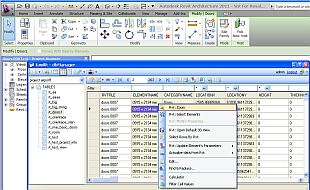
All families, whether local or in the network, can be gathered and managed. A clearly arranged dialogue Layout arranges all that important information, the available family types as well as image viewer and 3D viewer for families converted into dwf files are at a glance. (see our Family Library)
familyManager runs as an application under Revit Architecture/MEP/Structural. Using double click, families can be opened for editing directly from the familyManager or imported using drag&drop in actual projects. Also individual types from the type list can be downloaded und be put directly into the actual project being used. The existing Revit 'Load From Library' function can be substantially optimized with the adoption of familyManager, furthermore it is possible to quickly establish new types. Revit familyManager includes multi converter for Revit files turning them into DWF format. This way is the user being offered a possibility to access families in perfectly detailed 3D view.
In addition Revit Objects Browser is included. Now you can quickly find out asked elements and change parameter values.
NEW: Executable version of familyManager that runs without Revit.
Revit® & Family Library
Description
The adoption of parametric Family building elements is the core function at Revit Architecture. Approximately 18.000 families will be provided from our side, plus self compiled families, manufacturer libraries and component parts which were downloaded from the Internet. A mass of content which has to be structured efficiently. What Revit Architecture is missing is a high capacity content manager.
The sorting and grouping of families is possible exclusively with the commonly used Windows Explorer functions. In this way, the search for a specific component part can quickly turn into a proverbial 'Looking for a needle in a haystack'.
Revit® & Family Manager
Key Features
• Organization of Revit Families in a clearly arranged browser structure
• Application of Favourites for quick location of frequently used Families
• Direct downloading of families and family types in the already opened Revit project
• Comfortable insertion of new family types directly into FamilyManager
• Access into online libraries via direct Weblinks
• Simple view, measure, print and mark up of families using Autodesk® Design Review (after converting RFA into DWF format)
Screenshots
Revit®
Architecture
Revit® Architecture* software works the way you think, so you can create naturally, design freely, and deliver efficiently. And because it is purpose built for building information modeling (BIM), any change you make anytime, anywhere is automatically coordinated throughout your project. Designs and documentation stay coordinated, consistent, and complete.
MEP
Use an intuitive design tool that works the way engineers think. Optimize mechanical/electrical/plumbing (MEP) systems engineering through data driven system sizing and design. Minimize coordination errors between MEP engineering design teams, as well as with architects and structural engineers within Revit® based workflows. Revit® MEP software is the building information modeling design and documentation solution for MEP engineering.
Structure
Revit® Structure software integrates a multimaterial physical model with an independently editable analytical model for efficient analysis, design, and documentation. Create your own models or import architectural files from AutoCAD® Architecture or Revit® Architecture. Bidirectional linking to structural analysis software enables accurate model updates, while parametric change management technology coordinates those updates across your documents.

dbM
LOGIN